Free ATS Resume Checker: Why Most Resumes Never Reach a Human
You applied for 40 jobs and heard nothing back. It is probably not your experience — it is software rejecting you before a human ever sees your name. Here is how an ATS resume checker fixes that.
You spent hours on your resume. You tailored it, proofread it, exported a clean PDF, and hit apply — 20, 40, maybe 60 times. And the reply that came back was silence. No interview, no rejection email, nothing. It is the most demoralising part of a job hunt, and most people quietly decide they are just not good enough.
Here is the uncomfortable truth: a machine probably rejected you before a single human read a word. An ats resume checker is the fastest way to find out why — and to fix it before your next application disappears into the same black hole.
Qualified candidates get filtered out every single day. Not because they are underqualified, but because their CV was never built to pass the system that reads it first. This guide breaks down exactly how that system works, why strong applicants get auto-rejected, and the step-by-step way to fix your resume before you apply again.
What is an ATS, really?
ATS stands for Applicant Tracking System. It is the software companies use to collect, sort, and filter job applications. When you upload your CV to a careers page or a job board, it rarely lands in someone's inbox. It lands in a database.
Before a recruiter opens a single profile, the ATS has already read your file, pulled out what it thinks are your name, contact details, work history, and skills, and scored how well you match the job. Recruiters then search and rank inside that database. If the software parsed you badly or scored you low, you are effectively invisible — even if you are perfect for the role.
This is not a niche tool used by a handful of giant firms. Mid-size companies, staffing agencies, and Gulf employers hiring at scale all lean on it, because a single opening can attract hundreds of applications. No human team can read them all. The software is the gatekeeper, and it does not care how hard you worked on the wording.
How an ATS resume checker sees your CV
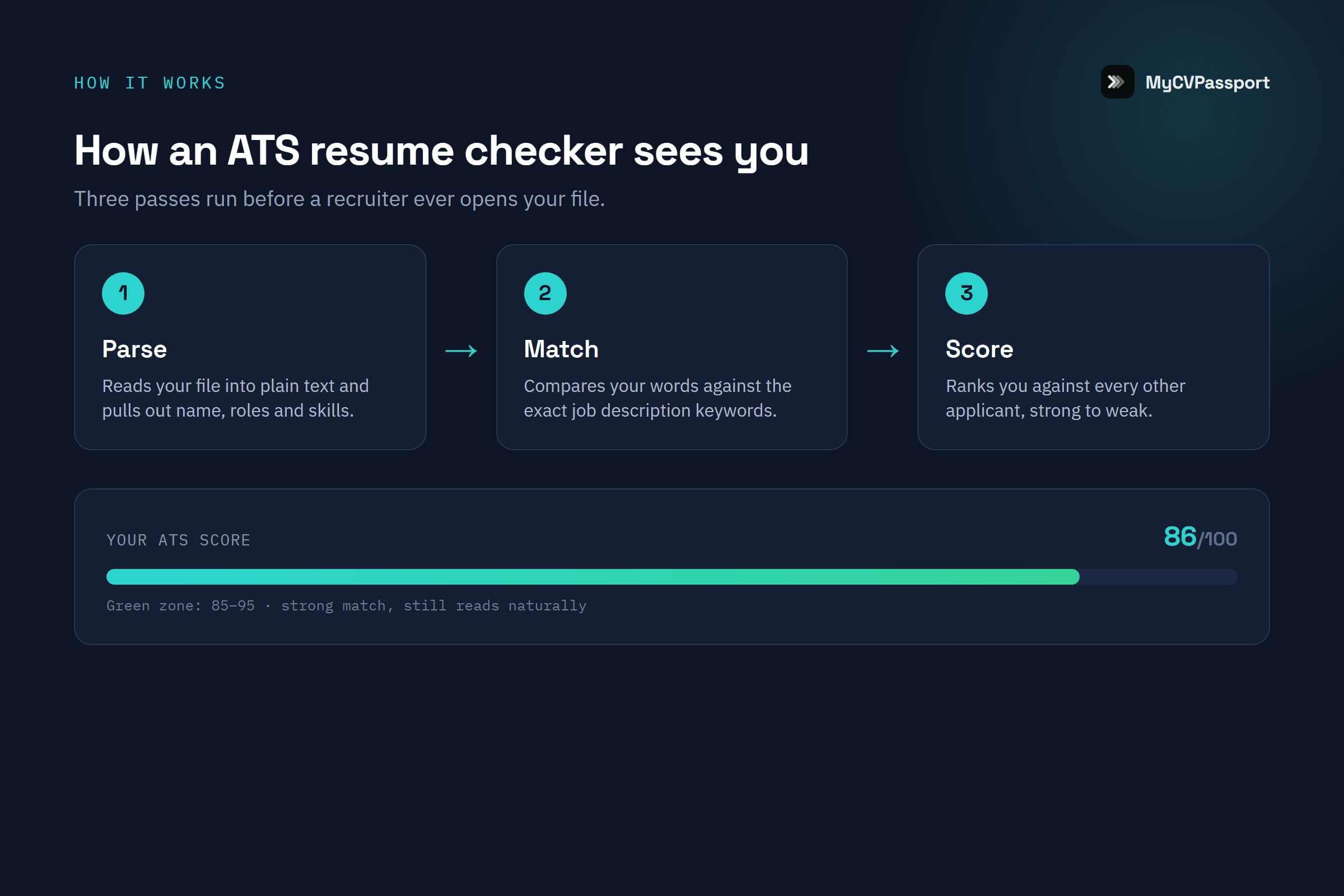
To understand why you get rejected, you have to understand what the machine is actually doing. An ats resume checker simulates the same three jobs a real ATS performs — and shows you where you fail each one.
1. Parsing — can it read you at all?
The first thing the software does is try to extract structured data from your file. It looks for a name, a phone number, an email, job titles, dates, and section headings. If your layout confuses it, this step breaks. A CV in two columns can get read left-to-right across both, scrambling your bullet points into nonsense. A job title stored inside a text box or a header image is often skipped entirely.
When parsing fails, the damage is silent. The recruiter never sees a garbled profile — they just never see you in their search results, because the keywords they searched for landed in a field the parser could not read.
2. Keyword matching — do you speak the job's language?
Next, the system compares your resume against the job description. It is looking for the specific skills, tools, certifications, and role terms the employer listed. If the posting asks for "accounts payable" and your CV only says "handled vendor payments," a basic keyword match may score you lower — even though you did exactly that work.
This is where strong candidates lose the most ground. You know you can do the job. But if you describe it in your own words instead of the words the employer used, the software cannot connect the dots.
3. Section completeness and scoring
Finally, the system checks that the expected building blocks are present and legible: a contact block, a work-experience section with real dates, education, and skills. Missing or mislabelled sections drag your score down. Creative headings like "Where I've Made an Impact" instead of "Work Experience" can quietly cost you, because the parser is matching against conventional labels.
The resume that wins is not the prettiest one. It is the one the machine can read cleanly, match to the job, and rank near the top.
Why strong candidates get auto-rejected
Once you see the three jobs above, the pattern behind the silence becomes obvious. It is almost never about talent. It is about format and language. Here are the failures that sink good applicants most often:
- Two-column layouts and sidebars that scramble when parsed into one stream of text.
- Skills or contact details inside headers, footers, or text boxes that the parser skips.
- Graphics, icons, and skill-rating bars that carry meaning to a human but read as nothing to software.
- Tables used for layout, which frequently get flattened into an unreadable jumble.
- Non-standard section headings the system does not recognise as work history or education.
- Missing job-specific keywords because you described your work in your own phrasing.
- Uncommon fonts or a scanned-image PDF, where the text is technically a picture and cannot be read at all.
None of these are about whether you can do the job. They are about whether the machine can confirm that you can. That is the gap an ats resume checker closes for you.
ATS-safe vs ATS-breaking formatting
Most fixes come down to formatting choices you can make in five minutes. This table is your quick reference — keep the left column, drop the right.
| Element | ATS-safe | ATS-breaking |
|---|---|---|
| Layout | Single column, top to bottom | Two columns or sidebars |
| Section titles | Work Experience, Education, Skills | Clever custom headings |
| Skills | Plain text list | Rating bars, stars, graphics |
| Contact info | In the body of the page | Inside the header or footer |
| File type | Text-based PDF or .docx | Scanned image or JPG of a CV |
| Dates | MMM YYYY, consistent format | Mixed or missing date formats |
| Fonts | Standard, widely-supported | Decorative or embedded webfonts |
Bad vs good: real fixes
Formatting gets you parsed. Wording gets you matched. Here is how to rewrite bullets so the software — and the recruiter — actually register your value. The pattern: mirror the job's language, and lead with what you did plus a result.
- Bad: "Responsible for handling customer issues." Good: "Resolved 40+ customer support tickets weekly, cutting average response time by 30%."
- Bad: "Worked on sales." Good: "Managed a portfolio of B2B accounts and exceeded quarterly sales targets by 15%."
- Bad: "Good with numbers and reports." Good: "Prepared monthly financial reports and reconciled accounts payable across three vendors."
- Bad: "Helped the team with projects." Good: "Coordinated a 5-person team to deliver two product launches on schedule."
Notice the good versions use concrete verbs, real numbers, and the exact terms an employer searches for. You are not exaggerating — you are translating your work into language the system recognises. For a deeper list of the terms recruiters and software look for, read Best resume keywords for 2026.
How to use a free ATS resume checker before you apply
Do not send another application blind. Run this loop once, and you will never look at your CV the same way again. It takes about ten minutes.
Step 1 — Get your baseline score
Upload your current CV to a free ATS checker and read the score it gives you. CVPassport's checker returns a live ATS score with the specific reasons behind it — not just a number, but what dragged it down. This is your starting point. If it is low, good: now you know why the silence happened.
Step 2 — Paste the job description
Scoring against a real job is where the tool earns its keep. Paste the description of the role you actually want to apply for. The checker compares your CV to that posting and shows the keywords and skills you are missing. Suddenly the gap between "I can do this job" and "the software knows I can" is visible.
Step 3 — Fix formatting first
Work through the ATS-safe table above. Collapse two columns into one, move contact details out of the header, replace skill bars with a plain list, and confirm your section headings are conventional. Formatting fixes usually move your score the most, because they unlock parsing.
Step 4 — Close the keyword gaps honestly
Add the missing skills and terms — but only the ones that are genuinely true for you. Rewrite weak bullets using the bad-vs-good pattern: concrete verb, real detail, matched language. If writing bullets is where you stall, CVPassport's AI bullet rewrites turn a flat line into a results-driven one in a click.
Step 5 — Re-scan and repeat
Run the checker again. Watch the score climb and the reasons disappear one by one. Repeat until the parsing issues are gone and your keyword match is strong. Then, and only then, apply. You have just done what most applicants never do — you checked before you sent.
Build it right from the start
Checking a broken CV tells you what is wrong. Building on an ATS-tested foundation means it is never wrong in the first place. CVPassport's single-column templates are built and tested to parse cleanly, so you spend your energy on wording and results instead of fighting layouts that quietly sabotage you.
It is free to start — three templates, no credit card. You get the live ATS score, AI bullet rewrites, and a resume that machines can read from the first draft. If you are applying across borders, the India-to-Gulf move has its own formatting expectations worth knowing; see the UAE CV format guide for 2026.
The candidates who get interviews are not always the most qualified. They are the ones whose CV made it past the gate. You can be both.
Frequently Asked Questions
Is an ATS resume checker actually free?
Yes — CVPassport's ATS checker is free to use. You upload your CV, optionally paste a job description, and get a live ATS score with the reasons behind it. You can start building an ATS-friendly resume with three free templates and no credit card.
Do all companies use an ATS?
Not every single one, but the majority of mid-size and large employers do, along with most staffing agencies and high-volume Gulf recruiters. Because you rarely know in advance which system a company uses, the safe move is to make every resume ATS-friendly by default. It never hurts a human reader, and it often decides whether a human reads you at all.
Will an ATS reject me for using a PDF?
A text-based PDF is generally safe and preferred. The problem is a scanned or image-based PDF — essentially a picture of your CV — because the text cannot be read. If you can highlight and copy the words in your PDF, a parser can too. If you cannot, export a fresh text-based file.
How many keywords should I add to my resume?
There is no magic number, and keyword stuffing backfires with both software and recruiters. Focus on genuinely matching the core skills and role terms in the job description. Quality of match beats quantity. Our resume keywords guide for 2026 breaks down which terms carry the most weight.
Why do I get rejected in minutes after applying?
A rejection that arrives within minutes is almost always automated — the ATS filtered you out on formatting or keyword criteria before anyone reviewed your profile. It is not a judgment on your ability. Run your CV through an ats resume checker, fix the parsing and keyword gaps, and that instant rejection usually stops happening.
I am a fresher with no experience — does this still apply?
Absolutely, and often more so, because freshers tend to reach for flashy templates that break parsing. Clean formatting, standard sections, and keywords from the job description matter just as much for entry-level roles. See 10 resume mistakes that get freshers auto-rejected for the specific traps to avoid.
Stop guessing why the replies never come. Run your CV through the checker, read the reasons, and fix them before your next application.